- Roundhouse Trust
- Participation


Effortless online enrolment for education activities
How the Roundhouse streamlined workshop registration by combining enrolment data capture with booking in one single journey.
Returning tickets online has, until now, always been challenging. Users need to be identified so we can validate who is allowed to make a return; order details need to be retrieved; then the selected returned items need to trigger the relevant updates in Tessitura. Add into the mix dynamic calculations to incorporate any return fees, and things can get complicated pretty quickly.
But today’s audiences expect to be able to do everything online, including managing bookings so it's time to find ways to meet these expectations or risk being left behind. Shakespeare’s Globe (a world-renowned theatre, education centre, and cultural landmark in the heart of London) partnered with us to explore this challenge. Could we find a way to deliver complex functionality that also feels easy to use and has seamless UX?
Ticket returns and exchanges are a key part of the visitor experience at the Globe, providing customers with ultimate flexibility and peace of mind. They're also an important way to retain income in the organisation by allowing the Globe to re-sell seats, rather than risking unofficial secondary market reselling.
However, issuing returns via the Box Office phone lines was consuming up to 60 days of staff time every year. With 80% of the Globe’s audiences being online bookers who therefore expect an end-to-end digital experience through all touchpoints of their engagement, an online returns service was needed that was hands-off for staff and cut down the amount of returns needing to be processed by the Box Office.
An online returns service was needed that delivered the following…
Shakespeare’s Globe had previously trialled the native TNEW return requests functionality - however this involves manual data processing with the return request storing as a constituent CSI until staff then process this request by hand, or run a stored procedure or utility to process it.
Action Links developed a one-stop shop, single page where a user can not only look up an order, but also choose which specific items within that order that they wish to return. This all sits on a subdomain of the Globe’s website meaning users can be directed here from a variety of places including the TNEW account; Tessitura order confirmation HTML emails; or even pre-visit emails.
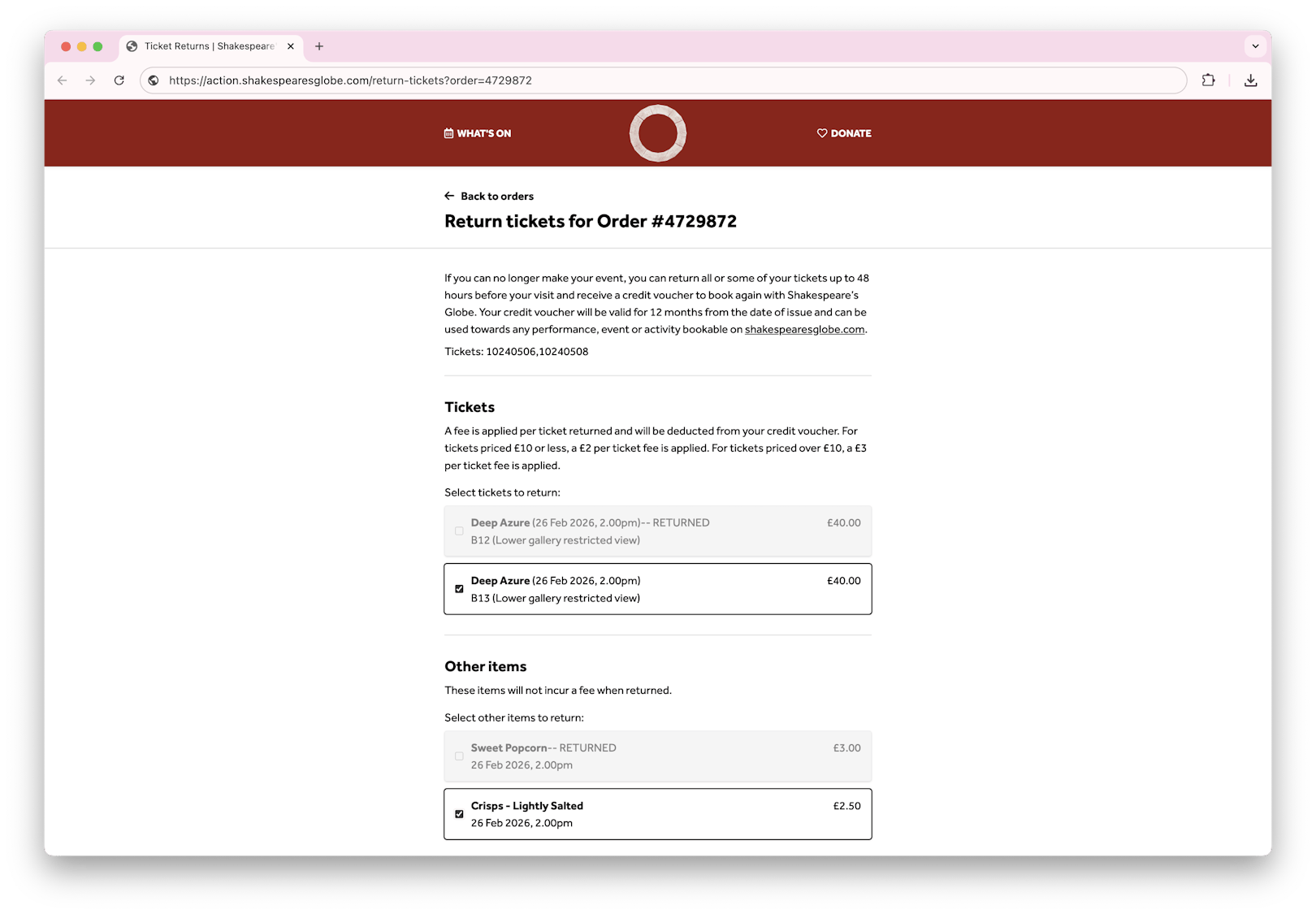
Select individual sub-line items to return
As the user selects their items to return, they can opt to have the full return amount returned to them as credit, or choose to donate some or all of that value back to the venue. Whichever they choose, Action Links makes a dynamic calculation and makes it clear to the user how much money will be donated and how much the user will get back as credit (plus any associated fees).
Then comes the real magic... behind the scenes Action Links triggers the return to be processed instantly via a series of API calls to Tessitura. This works by printing the returned tickets (only printed tickets can be returned) and adding them to a Tessitura session cart. We then fetch this cart to identify the value of the returned tickets minus any fees, before adding credit on account to the value of any donation (contributions can't be checked out in the same transaction as ticket returns, so we'll process the donation using the on account credit after checking out the return) and then add a gift certificate to the value of the cart.
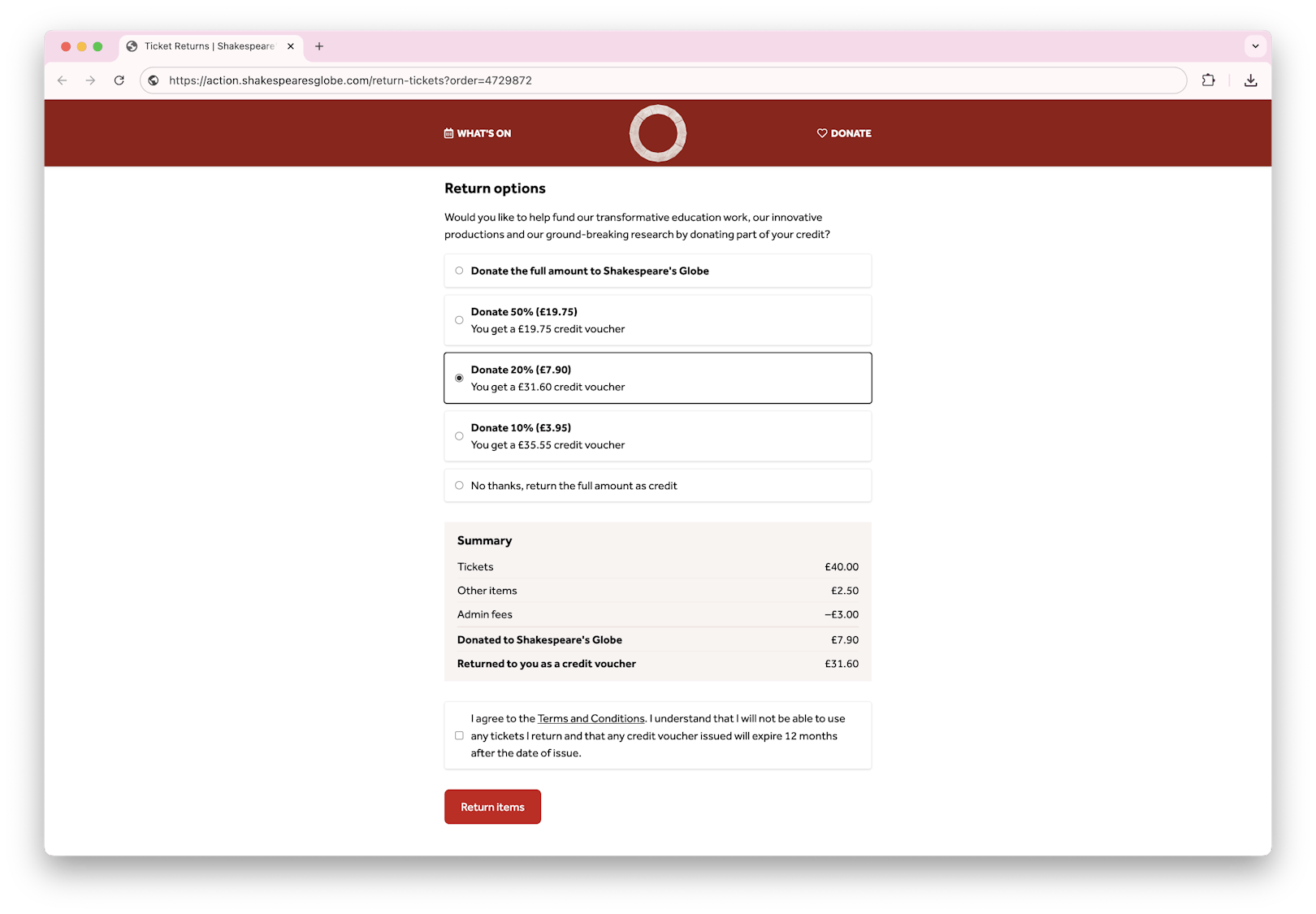
Complete transparency of any donations, fees and returned credit
The final step is checking out the cart. If the user elected to donate a portion of their ticket return, we reload the order, add the donation to the cart and apply the on account credit we added in the step before, then finally check out the cart again.
Et voila! This all happens in matter of seconds - no waiting overnight for procedures to run and no manual intervention from staff. The user is shown an on-screen confirmation that the return has completed along with their credit voucher number and is also sent an automated email confirmation. The venue now has a record of tickets in the original order being voided, and a record of the credit voucher issued in a new order.
Although this is a newly launched user journey, the team at Shakespare’s Globe are already feeling the benefits and we’ll be watching keenly to measure the amount of time being saved in Box Office administration; the amount of revenue made from resold seats and donations; and the proportion of returns that are now including donations compared to previous periods.
We understand that no two venues are ever the same so if your organisation is thinking of offering online returns, here's a few points of flexible configuration that you may want to consider...
How the Roundhouse streamlined workshop registration by combining enrolment data capture with booking in one single journey.

A nimble solution to building a complex booking journey for London & Whipsnade Zoo's flexible admission tickets, without the need for custom checkout development.
How Museum Wales learnt more about their visitors by using more efficient system integrations, whilst also cutting down manual tasks for staff.